Using BuildKite with AWS CodeBuild
Published: Apr 3, 2026
Last updated: Apr 3, 2026
I've been looking for alternatives to GitHub Actions for running my CI/CD pipelines. I have previously had a good experience with Buildkite (albeit circa 2018), but pre-revenue I am looking at avenues for reducing costs as much as possible without requiring any significant refactors later on.
Although BuildKite offers some recommended templates for AWS that can scale CI alongside your team, I have been keen to first check out a more controlled approach with AWS CodeBuild which I believe can enable some cost-savings early in the project.
This blog post is a recap on my own internal investigation into configuring this setup.
Overview
The blog post covers my proof-of-concept. In it, we still host code on a private GitHub repository but creating a pull request should trigger CI to run with BuildKite + CodeBuild.
We will be using the AWS CDK to configure as much as possible for this, but there will still be some requirements where you will need to jump onto the AWS dashboard.
The desired outcome here is to run a simple build which makes use of AWS CodeBuild. Do not expect anything more advanced in this tutorial. I will cover more advanced use cases in future blog posts.
The following sequence diagram is an overview of our desired workflow for this post:
Prerequisites
You need the following already configured if you are following along with this tutorial:
- A Buildkite account.
- A GitHub account.
- A prepared, private GitHub repository.
- An AWS account.
The following is also recommended:
- Experience with the AWS CDK for declaring infrastructure-as-code.
- Experience with managing GitHub repositories.
Configuring a deploy key for your private GitHub repository
Assuming that you have already prepared a private Github repository for this tutorial, you will need to configure a deploy key so that Buildkite can access this private repository.
From the command line, you can run the following:
# Generate the key at ~/.ssh/buildkite-codebuild-poc $ ssh-keygen -t ed25519 -C "buildkite-codebuild-poc" -f ~/.ssh/buildkite-codebuild-poc
When generating a key, do not add a passphrase as this key will be used by the Buildkite agent.
If created successfully, it should output both the public key ~/.ssh/buildkite-codebuild-poc.pub and the private key ~/.ssh/buildkite-codebuild-poc.pub.
You first need to add the public key to your private GitHub repository as a deploy key. You can find this under your private repository settings.
The private key itself will need to be added as a secret for your Buildkite agent.
Setting the private deploy key as a Buildkite agent secret
Within Buildkite, there are domain-specific terms for clusters, pipelines, agents and queues.
While I won't be deep diving into these terms, please note that will be touching on all of these at some point.
If you are not familiar with these terms, it's worth having a read through the Buildkite glossary page to bring you up to speed.
To add your private key as a secret, head to the Buildkite dashboard and then go to your selected agent cluster. If you do not have one configured, select your default cluster.
From within your cluster, there will be a setting option for Secrets. Add your secret under our very apt key name SUPER_SECRET_SSH_KEY. This will map across to our Buildkite pipeline configuration we add later.
Getting an agent token for your Buildkite cluster
Next, you will need to configure an agent token. This token while be used by AWS components in order for communication between CodeBuild and Buildkite.
Within your same selected agent cluster, there will be a setting option for Agent Tokens. Create an agent token from within this UI.
For agent tokens, you can also lock down which inbound IP addresses are allowed. For this post, we will just allow all IP addresses for now.
If you are worried about security, go ahead and configure the AWS IP ranges.
Creating a Buildkite pipeline
Follow the Buildkite Pipelines UI and create a new pipeline. As part of this process, you will need to select your private GitHub repository to use.
Be sure that you select the pipeline to run from the agent that you have already configured with the secrets.
It has been covered in this blog post, but we expect that you've connected to your GitHub account through OAuth via the Buildkite settings. If you have not, go to your settings and ensure that you authorize Buildkite to connect to your GitHub account.
When creating, be sure to leave "auto-create webhooks" on so that Buildkite will create the webhooks for you within the Github repository.
As for the section about the "script" to run, add the following YAML:
steps: - label: ":aws: hello from codebuild" command: ./scripts/hello-world.sh plugins: - git-ssh-checkout#v0.4.1: ssh-secret-key-name: SUPER_SECRET_SSH_KEY repository-url: git@github.com:okeeffed/blog-codebuild-buildkite.git agents: queue: default-queue project: codebuild-buildkite-codebuild-poc-runner
Albeit we haven't wrote any code yet, the pipeline code about does the following:
- Runs a script from
./scripts/hello-world.sh. - Makes use of a plugin
git-ssh-checkoutwhich makes use of our deploy key to authorize the pipeline to pull down the codebase. - Sets the agent to run on the
default-queuewhere we expect the project name to becodebuild-buildkite-codebuild-poc-runner.
The default-queue comes from the aptly named default queue for the agent. It's worth sense-checking that this is the same name for your queue.
At this point, our Buildkite configuration is ready to go, but we need to configure AWS to run.
Writing the CodeBuild Foundation CDK stack
For our configuration with the AWS CDK, we will be deploying two stacks:
- A "foundation" stack which sets up our AWS SecretsManager secret as well as an AWS CodeConnection which authorizes CodeBuild with GitHub.
- A "runner" stack which will create our AWS CodeBuild build service.
First, we need to configure the foundation stack. I will be doing so in TypeScript.
If you have not yet configured it, please follow the AWS CDK guide to initializing a stack.
Within lib/buildkite-foundation-stack.ts, add the following code:
import * as cdk from "aws-cdk-lib"; import * as codeconnections from "aws-cdk-lib/aws-codeconnections"; import * as secretsmanager from "aws-cdk-lib/aws-secretsmanager"; import * as ssm from "aws-cdk-lib/aws-ssm"; import { Construct } from "constructs"; const buildkiteAgentTokenSecretName = "buildkite-codebuild-poc/buildkite-agent-token"; export const codeConnectionsArnParameterName = "/buildkite-codebuild-poc/codeconnections-arn"; export class BuildkiteFoundationStack extends cdk.Stack { public readonly buildkiteAgentTokenSecretName = buildkiteAgentTokenSecretName; constructor(scope: Construct, id: string, props?: cdk.StackProps) { super(scope, id, props); const buildkiteAgentToken = new cdk.CfnParameter( this, "BuildkiteAgentToken", { type: "String", noEcho: true, description: "Buildkite agent token from your Buildkite cluster.", } ); const existingCodeConnectionsArn = new cdk.CfnParameter( this, "ExistingCodeConnectionsArn", { type: "String", default: "", description: "Optional existing authorized AWS CodeConnections ARN. Leave empty to let this stack create the connection resource.", } ); const createCodeConnection = new cdk.CfnParameter( this, "CreateCodeConnection", { type: "String", default: "true", allowedValues: ["true", "false"], description: "Set to true to create the CodeConnections resource in this stack. You must still authorize it in the AWS console.", } ); const codeConnectionName = new cdk.CfnParameter( this, "CodeConnectionName", { type: "String", default: "buildkite-github", description: "Name to use when CreateCodeConnection=true.", } ); const useManagedCodeConnection = new cdk.CfnCondition( this, "UseManagedCodeConnection", { expression: cdk.Fn.conditionEquals( createCodeConnection.valueAsString, "true" ), } ); const agentTokenSecret = new secretsmanager.CfnSecret( this, "BuildkiteAgentTokenSecret", { name: buildkiteAgentTokenSecretName, description: "Buildkite agent token for the CodeBuild-hosted Buildkite runner proof of concept.", secretString: buildkiteAgentToken.valueAsString, } ); const managedCodeConnection = new codeconnections.CfnConnection( this, "ManagedCodeConnection", { connectionName: codeConnectionName.valueAsString, providerType: "GitHub", } ); managedCodeConnection.cfnOptions.condition = useManagedCodeConnection; // A CodeConnections resource can be provisioned by CloudFormation, but the // GitHub authorization handshake still needs to be completed in the console. const effectiveCodeConnectionsArn = cdk.Fn.conditionIf( useManagedCodeConnection.logicalId, managedCodeConnection.attrConnectionArn, existingCodeConnectionsArn.valueAsString ).toString(); const buildkiteAgentTokenSecretArn = secretsmanager.CfnSecret.arnForSecret(agentTokenSecret); new ssm.StringParameter(this, "CodeConnectionsArnParameter", { parameterName: codeConnectionsArnParameterName, stringValue: effectiveCodeConnectionsArn, description: "CodeConnections ARN used by the Buildkite CodeBuild runner stack.", }); new cdk.CfnOutput(this, "BuildkiteAgentTokenSecretName", { value: this.buildkiteAgentTokenSecretName, description: "Secrets Manager secret that stores the Buildkite agent token.", }); new cdk.CfnOutput(this, "BuildkiteAgentTokenSecretArn", { value: buildkiteAgentTokenSecretArn, description: "Secrets Manager ARN for the Buildkite agent token secret.", }); new cdk.CfnOutput(this, "CodeConnectionsArnOutput", { value: effectiveCodeConnectionsArn, description: "CodeConnections ARN for the repository provider used by the runner project.", }); new cdk.CfnOutput(this, "CodeConnectionsArnParameterName", { value: codeConnectionsArnParameterName, description: "SSM parameter name that stores the CodeConnections ARN for the runner stack.", }); new cdk.CfnOutput(this, "ManagedCodeConnectionArn", { value: managedCodeConnection.attrConnectionArn, description: "Authorize this connection in the AWS console before deploying the runner stack.", condition: useManagedCodeConnection, }); new cdk.CfnOutput(this, "ManagedCodeConnectionStatus", { value: managedCodeConnection.attrConnectionStatus, description: "The managed CodeConnections status. It remains pending until the GitHub authorization is completed.", condition: useManagedCodeConnection, }); } }
As mentioned previously, this code will set up our Buildkite agent secret within AWS SecretsManager and also prepare our CodeConnection to GitHub.
The latter requires a manual step, so we will need to deploy this stack and then jump into the AWS dashboard to finish off the authorization.
Before doing that, we will finish off our "runner" stack as well.
Writing the CodeBuild Runner CDK stack
Within lib/codebuild-runner-stack.ts, add the following code:
import * as cdk from "aws-cdk-lib"; import * as codebuild from "aws-cdk-lib/aws-codebuild"; import * as codeconnections from "aws-cdk-lib/aws-codeconnections"; import * as cr from "aws-cdk-lib/custom-resources"; import * as iam from "aws-cdk-lib/aws-iam"; import * as secretsmanager from "aws-cdk-lib/aws-secretsmanager"; import { Construct } from "constructs"; const projectName = "buildkite-codebuild-poc-runner"; const buildkiteAgentTag = `codebuild-${projectName}`; const buildkiteAgentTokenSecretName = "buildkite-codebuild-poc/buildkite-agent-token"; export class BuildkiteCodebuildPocStack extends cdk.Stack { constructor(scope: Construct, id: string, props?: cdk.StackProps) { super(scope, id, props); const buildkiteAgentToken = new cdk.CfnParameter( this, "BuildkiteAgentToken", { type: "String", noEcho: true, description: "Buildkite agent token from your Buildkite cluster.", } ); const codeConnectionsArn = new cdk.CfnParameter( this, "CodeConnectionsArn", { type: "String", default: "", description: "AWS CodeConnections ARN for the repository provider used by the Buildkite runner project.", } ); const createCodeConnection = new cdk.CfnParameter( this, "CreateCodeConnection", { type: "String", default: "false", allowedValues: ["true", "false"], description: "Set to true to create the CodeConnections resource in this stack. You must still authorize it in the AWS console.", } ); const codeConnectionName = new cdk.CfnParameter( this, "CodeConnectionName", { type: "String", default: "buildkite-github", description: "Name to use when CreateCodeConnection=true.", } ); const useManagedCodeConnection = new cdk.CfnCondition( this, "UseManagedCodeConnection", { expression: cdk.Fn.conditionEquals( createCodeConnection.valueAsString, "true" ), } ); const managedCodeConnection = new codeconnections.CfnConnection( this, "ManagedCodeConnection", { connectionName: codeConnectionName.valueAsString, providerType: "GitHub", } ); managedCodeConnection.cfnOptions.condition = useManagedCodeConnection; // A CodeConnections resource can be provisioned by CloudFormation, but the // GitHub authorization handshake still needs to be completed in the console. const effectiveCodeConnectionsArn = cdk.Fn.conditionIf( useManagedCodeConnection.logicalId, managedCodeConnection.attrConnectionArn, codeConnectionsArn.valueAsString ).toString(); // The console-created runner project grants permissions against both the // newer codeconnections ARN form and the legacy codestar-connections ARN form. const connectionId = cdk.Fn.select( 1, cdk.Fn.split("connection/", effectiveCodeConnectionsArn) ); const codestarConnectionsArn = cdk.Stack.of(this).formatArn({ service: "codestar-connections", resource: "connection", resourceName: connectionId, }); const agentTokenSecret = new secretsmanager.CfnSecret( this, "BuildkiteAgentTokenSecret", { name: buildkiteAgentTokenSecretName, description: "Buildkite agent token for the CodeBuild-hosted Buildkite runner proof of concept.", secretString: buildkiteAgentToken.valueAsString, } ); const serviceRole = new iam.Role(this, "CodeBuildServiceRole", { assumedBy: new iam.ServicePrincipal("codebuild.amazonaws.com"), description: "Service role for the Buildkite runner proof of concept CodeBuild project.", }); // The runner project needs the usual CodeBuild log permissions, read access // to the Buildkite agent token secret, and CodeConnections access so CodeBuild // can validate and use the linked repository connection. const runnerAccessPolicy = new iam.Policy( this, "CodeBuildRunnerAccessPolicy", { statements: [ new iam.PolicyStatement({ actions: [ "logs:CreateLogGroup", "logs:CreateLogStream", "logs:PutLogEvents", ], resources: ["*"], }), new iam.PolicyStatement({ actions: ["secretsmanager:GetSecretValue"], resources: [agentTokenSecret.attrId], }), new iam.PolicyStatement({ // CodeBuild validates the connection during project updates and uses // the connection at job runtime, so it needs more than just UseConnection. actions: [ "codeconnections:GetConnection", "codeconnections:GetConnectionToken", "codeconnections:UseConnection", "codestar-connections:GetConnection", "codestar-connections:GetConnectionToken", "codestar-connections:UseConnection", ], resources: [effectiveCodeConnectionsArn, codestarConnectionsArn], }), ], } ); serviceRole.attachInlinePolicy(runnerAccessPolicy); const runnerProject = new codebuild.Project( this, "BuildkiteRunnerProject", { projectName, description: "Proof-of-concept CodeBuild project that runs Buildkite jobs in an ephemeral CodeBuild runner.", role: serviceRole, // Runner builds ignore the project buildspec unless explicitly overridden, // but NO_SOURCE projects still require an inline buildspec in the API model. buildSpec: codebuild.BuildSpec.fromObject({ version: "0.2", phases: { build: { commands: [ 'echo "Buildkite runner project uses the managed runner build flow"', ], }, }, }), environment: { computeType: codebuild.ComputeType.SMALL, buildImage: codebuild.LinuxBuildImage.STANDARD_6_0, }, environmentVariables: { CODEBUILD_CONFIG_BUILDKITE_AGENT_TOKEN: { type: codebuild.BuildEnvironmentVariableType.SECRETS_MANAGER, value: buildkiteAgentTokenSecretName, }, }, queuedTimeout: cdk.Duration.minutes(30), timeout: cdk.Duration.minutes(30), visibility: codebuild.ProjectVisibility.PRIVATE, } ); const runnerProjectResource = runnerProject.node .defaultChild as codebuild.CfnProject; // Buildkite runner projects created in the console still use NO_SOURCE, but // they also carry CodeConnections-backed source auth and clone depth settings. // Without these source properties, CreateWebhook(RUNNER_BUILDKITE_BUILD) fails. runnerProjectResource.addPropertyOverride("Source.Auth", { Type: "CODECONNECTIONS", Resource: effectiveCodeConnectionsArn, }); runnerProjectResource.addPropertyOverride("Source.GitCloneDepth", 1); runnerProjectResource.addPropertyOverride("Source.BuildSpec", ""); runnerProject.node.addDependency(agentTokenSecret); // Updating the project to use CodeConnections can fail if CloudFormation // applies the project update before the runner access policy exists. runnerProject.node.addDependency(runnerAccessPolicy); const runnerWebhook = new cr.AwsCustomResource( this, "BuildkiteRunnerWebhook", { installLatestAwsSdk: false, onCreate: { service: "CodeBuild", action: "createWebhook", parameters: { projectName, buildType: "RUNNER_BUILDKITE_BUILD", filterGroups: [[{ type: "EVENT", pattern: "WORKFLOW_JOB_QUEUED" }]], // The console includes a default PR approval policy for GitHub-backed // Buildkite runner webhooks. Without this field, CreateWebhook returns // a generic InvalidInputException for an otherwise valid project. pullRequestBuildPolicy: { requiresCommentApproval: "ALL_PULL_REQUESTS", approverRoles: [ "GITHUB_WRITE", "GITHUB_MAINTAIN", "GITHUB_ADMIN", ], }, }, physicalResourceId: cr.PhysicalResourceId.of( `${projectName}-buildkite-webhook` ), }, onUpdate: { service: "CodeBuild", action: "updateWebhook", parameters: { projectName, buildType: "RUNNER_BUILDKITE_BUILD", filterGroups: [[{ type: "EVENT", pattern: "WORKFLOW_JOB_QUEUED" }]], pullRequestBuildPolicy: { requiresCommentApproval: "ALL_PULL_REQUESTS", approverRoles: [ "GITHUB_WRITE", "GITHUB_MAINTAIN", "GITHUB_ADMIN", ], }, }, physicalResourceId: cr.PhysicalResourceId.of( `${projectName}-buildkite-webhook` ), }, onDelete: { service: "CodeBuild", action: "deleteWebhook", parameters: { projectName, }, ignoreErrorCodesMatching: "ResourceNotFoundException", }, policy: cr.AwsCustomResourcePolicy.fromSdkCalls({ resources: cr.AwsCustomResourcePolicy.ANY_RESOURCE, }), } ); runnerWebhook.node.addDependency(runnerProject); new cdk.CfnOutput(this, "CodeBuildProjectName", { value: projectName, description: "The CodeBuild project name referenced from Buildkite agent tags.", }); new cdk.CfnOutput(this, "BuildkiteAgentTagProjectValue", { value: buildkiteAgentTag, description: "Use this value in Buildkite YAML as agents.project.", }); new cdk.CfnOutput(this, "BuildkiteWebhookPayloadUrl", { value: runnerWebhook.getResponseField("webhook.payloadUrl"), description: "Copy this into the Buildkite organization webhook URL field.", }); new cdk.CfnOutput(this, "BuildkiteWebhookSecret", { value: runnerWebhook.getResponseField("webhook.secret"), description: "Copy this into the Buildkite organization webhook token field.", }); new cdk.CfnOutput(this, "BuildkiteAgentTokenSecretName", { value: buildkiteAgentTokenSecretName, description: "Secrets Manager secret that stores the Buildkite agent token.", }); new cdk.CfnOutput(this, "CodeConnectionsArnOutput", { value: effectiveCodeConnectionsArn, description: "CodeConnections ARN attached to the Buildkite runner project source auth.", }); new cdk.CfnOutput(this, "ManagedCodeConnectionArn", { value: managedCodeConnection.attrConnectionArn, description: "Authorize this connection in the AWS console before using it for the runner project.", condition: useManagedCodeConnection, }); new cdk.CfnOutput(this, "ManagedCodeConnectionStatus", { value: managedCodeConnection.attrConnectionStatus, description: "The managed CodeConnections status. It will remain pending until the GitHub authorization is completed.", condition: useManagedCodeConnection, }); } }
There is a quite a lot going on here, so I will keep what it does as concise as possible:
- Provisions a CodeBuild project that runs ephemeral Buildkite agents to execute pipeline jobs
- Stores the Buildkite agent token securely in AWS Secrets Manager and injects it at runtime
- Supports GitHub integration via AWS CodeConnections (existing or optionally created)
- Creates an IAM role with permissions for logs, secrets access, and CodeConnections usage
- Configures CodeBuild to act as a Buildkite runner using CodeConnections-backed source auth
- Sets up a custom webhook (
RUNNER_BUILDKITE_BUILD) to trigger builds from Buildkite events - Ensures correct resource dependencies and deployment order for reliable setup
- Outputs key values (webhook URL/secret, project name, agent tag) for Buildkite configuration
In the above code, it's worth noting that I just got it working. Some things like the conditional CodeConnections stuff can definitely be cleaned up just to always reference the code connection we create in the foundation stack.
Finally, we will need to update our bin/buildkite-codebuild-poc.ts file to have the following:
#!/usr/bin/env node import * as cdk from "aws-cdk-lib"; import { BuildkiteFoundationStack } from "../lib/buildkite-foundation-stack"; import { BuildkiteRunnerStack } from "../lib/buildkite-runner-stack"; const app = new cdk.App(); const env = { account: process.env.CDK_DEFAULT_ACCOUNT, region: process.env.CDK_DEFAULT_REGION, }; new BuildkiteFoundationStack(app, "BuildkiteFoundationStack", { env, }); new BuildkiteRunnerStack(app, "BuildkiteRunnerStack", { env, });
At this point, we are ready to deploy our AWS stacks and do our final configuration touches.
Deploying our CodeBuild Foundation CDK stack
To deploy our foundation stack, first be sure to obtain your Buildkite agent token that we created earlier.
Next, run the following:
$ npx cdk deploy BuildkiteFoundationStack --parameters BuildkiteAgentToken=<replace-with-your-agent-token>
There is an assumption here that you have already configured your AWS credentials locally in order to run these commands.
If successful, this will give you outputs like the following:
Outputs:
BuildkiteFoundationStack.BuildkiteAgentTokenSecretArn = REDACTED
BuildkiteFoundationStack.BuildkiteAgentTokenSecretName = buildkite-codebuild-poc/buildkite-agent-token
BuildkiteFoundationStack.CodeConnectionsArnOutput = REDACTED
BuildkiteFoundationStack.CodeConnectionsArnParameterName = REDACTED
BuildkiteFoundationStack.ManagedCodeConnectionArn = REDACTED
BuildkiteFoundationStack.ManagedCodeConnectionStatus = PENDING
Stack ARN:
arn:aws:cloudformation:REDACTED:REDACTED:stack/BuildkiteFoundationStack/REDACTED
You will notice the ManagedCodeConnectionStatus is PENDING. In this state, you need to head to your AWS Dashboard and find the correlating code connection to authorize access.
I find this easiest when heading to the CloudFormation dashboard, finding the foundation stack we deployed and clicking through the resource link directly to the code connection page.


Cloudformation dashboard
From there, you can find and click through to the pending code connection.
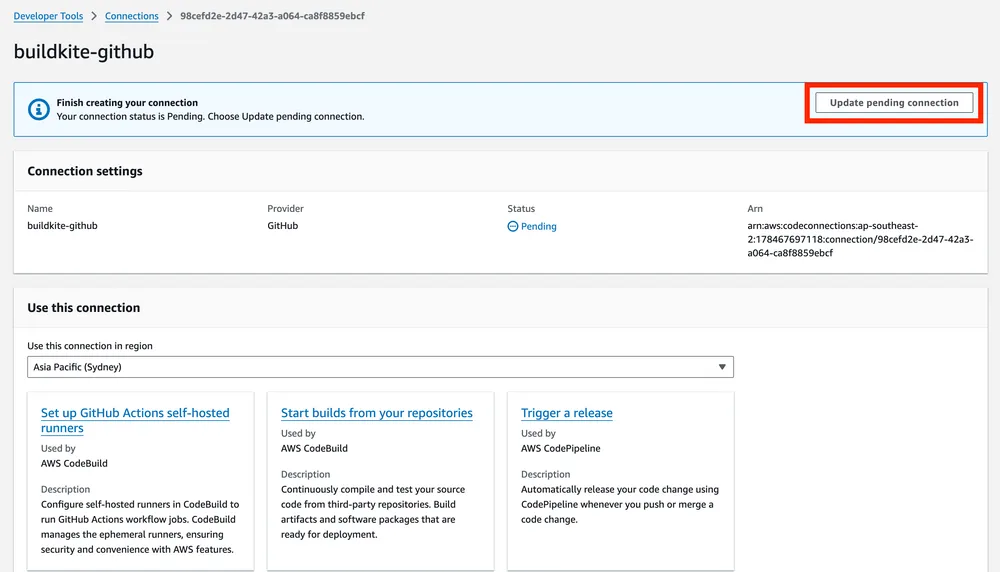
Pending code connection
Select to complete the process and you will get a popup:

Pending code connection popup
If successful, the connection should move to an available status:

Available code connection
Deploying our CodeBuild Runner CDK Stack
With this configured, we can next deploy our CodeBuild Runner stack with npx cdk deploy BuildkiteRunnerStack.
Once successful, you will get outputs like the following:
Outputs:
BuildkiteRunnerStack.BuildkiteAgentTagProjectValue = codebuild-buildkite-codebuild-poc-runner
BuildkiteRunnerStack.BuildkiteWebhookPayloadUrl = REDACTED
BuildkiteRunnerStack.BuildkiteWebhookSecret = REDACTED
BuildkiteRunnerStack.CodeBuildProjectName = buildkite-codebuild-poc-runner
BuildkiteRunnerStack.CodeConnectionsArnOutput = REDACTED
Stack ARN:
arn:aws:cloudformation:REDACTED:REDACTED:stack/BuildkiteRunnerStack/REDACTED
You will notice that the BuildkiteAgentTagProjectValue of codebuild-buildkite-codebuild-poc-runner matches what we configured earlier in our Buildkite pipeline YAML.
Add the CodeBuild webhook into Buildkite
Now that we have deployed the resources, you will need to copy the outputs BuildkiteWebhookSecret and BuildkiteWebhookPayloadUrl from the runner stack and add them into your Buildkite Notification Services configuration.
This is found from within your Buildkite organization settings.
Once there, select to add a webhook and set the payload URL as the webhook URL and set the token as the webhook secret. Make sure that it selected for sending the token as X-Buildkite-Token.
For the webhook, you only need to configure notifications for job.scheduled.
Finally, make sure that you set it to only send for our created pipeline.
Pushing our code
Everything should now be configured to run for our Buildkite + CodeBuild set up.
Push your code up to the repository and then check both your Buildkite dashboard as well as your CodeBuild dashboard to confirm everything is now working.
On Buildkite:

Buildkite job
On CodeBuild:

CodeBuild logs
Your GitHub status checks should now also be passing:

GitHub status check
Success!
Conclusion
In this post, I recapped my proof-of-concept for getting Buildkite and AWS CodeBuild working together for a private GitHub repository.
We also used the AWS CDK to configure the AWS portion of the infrastructure.
For further ideas on this project:
- Clean up the CDK code further.
- Attempt a more complicated pipeline.
- Make use of different Docker containers for running the code.
- Use another IaC provider to configure the BuildKite portion of the code.
- Make use of the Buildkite SDK/CLI for management of the pipeline.
In future posts, I may recap some of these ideas in my own implementation.
Links and Further Reading
Photo credit: johnnyb803


Using BuildKite with AWS CodeBuild
Introduction
